
Best overall: Open Dental for configurable dental practice management. Best for multi-location cloud operations: CareStack. Best for online appointment booking: Calendra. This 2026 dental clinic management software guide separates full clinical systems from scheduling software so you choose the right category before comparing products.
- Open Dental is the default dental clinic management software shortlist choice when clinical records and configurable workflows come first.
- CareStack fits practices evaluating cloud-based dental practice management across multiple locations.
- Dentrix belongs on the shortlist for an established practice seeking connected clinical and administrative workflows.
- Calendra is best for clinics that need online appointment scheduling, not a replacement for dental clinical records.
Why this matters
Appointment scheduling and dental practice management solve different problems. A booking system helps patients reserve time. A dental management system also needs to support the clinical and administrative work surrounding that visit.
Buying the wrong category leaves a gap. A clinic replacing its patient-record system needs more than a booking page; a clinic with dependable clinical software might only need a better way to accept appointments.
For your 2026 shortlist, start with the problem you need to fix. Separate patient access, clinical documentation, billing and reporting rather than assuming every product handles all of them equally.
This distinction also keeps demonstrations useful. Instead of watching a general feature tour, ask each supplier to show the work your receptionist, dentist and practice manager actually perform.
What makes the best dental clinic management software
Use these criteria before reading the ranking. A feature matters only when it supports your clinic's work and fits the rules under which your practice operates.
- Clinical depth: Check dental charting, treatment planning, patient histories and the connection between a completed visit and its documentation.
- Appointment control: Examine appointment types, staff availability, changes and the process for accepting patient booking requests.
- Administrative fit: Review billing, patient balances, reporting and the requirements that apply in your country.
- Deployment fit: Decide whether your practice wants a locally managed system or a cloud-based service, then assess its operational responsibilities.
- Data continuity: Confirm how records enter the system, how your team retrieves them and what happens when you leave.
- Daily usability: Ask the people doing the work to complete realistic tasks rather than judging software from a presentation alone.
Do not give every criterion equal weight. A practice replacing clinical software should put records and continuity first. A practice keeping its current system should assess the narrower scheduling problem without reopening an unnecessary migration project.
Dental clinic software at a glance
The 2026 ranking below assigns each option a distinct role. The limitations describe the buying trade-offs, not claims that a supplier lacks every feature outside its main use case.
| Rank and option | Best for | Standout capability | Key limitation |
|---|---|---|---|
| 1. Open Dental | Configurable dental practice workflows | Open-source dental practice management | Configuration and ongoing ownership need clear responsibility |
| 2. CareStack | Multi-location cloud operations | Cloud-based dental practice management | Shared workflows require agreement across locations |
| 3. Dentrix | Established practice workflows | Connected clinical and administrative functions | Edition and deployment choices need careful comparison |
| 4. Calendra | Online appointment booking | Customer bookings available 24/7 | Its stated role is scheduling, not full dental clinical management |
The first decision is not which row has the longest feature list. It is whether you need to replace the clinical system, coordinate locations or improve appointment access.
1. Open Dental: best for configurable dental workflows
Open Dental is dental practice management software with clinical and administrative functions, including charting, treatment planning, scheduling and billing. Its open-source model distinguishes it from proprietary alternatives and makes it relevant when configuration matters to your practice.
Open Dental is the default shortlist choice for a practice buying around dental records rather than bookings alone. That recommendation depends on your team taking responsibility for implementation, support arrangements and the way the system is maintained.
Open Dental pros
- Dental-specific charting and treatment planning address work beyond the appointment calendar.
- Scheduling and billing sit within the practice-management environment.
- The open-source model is relevant to buyers who want to examine customization and technical control.
Open Dental cons
- Flexibility does not remove the need for setup decisions, staff training and support.
- Your practice needs a clear owner for configuration, access and maintenance arrangements.
- Local billing and reporting requirements still need a demonstration; dental functionality alone does not prove regional fit.
Best for: A practice that wants configurable dental workflows and can define who owns the system after implementation.
During a demonstration, follow a patient from appointment creation through charting, treatment planning and account review. Ask the team to show a correction as well as a clean transaction. Handling exceptions matters as much as completing the ideal visit.
Verdict: Buy if dental-specific records and configurable workflows are your priorities.
2. CareStack: best for multi-location cloud operations
CareStack is a cloud-based dental practice management platform. It belongs on the shortlist when a group wants to assess clinical and administrative work across locations within a shared operating environment.
The buying question is not simply whether staff can sign in from different places. You need to see which information and settings are shared, which remain location-specific and how managers review performance without weakening access controls.
CareStack pros
- A cloud-based platform provides a common environment to evaluate across locations.
- Dental practice management covers a broader scope than appointment booking alone.
- Its multi-location focus makes group-level workflows a relevant demonstration priority.
CareStack cons
- Shared software does not resolve disagreements about processes between locations.
- Cloud access makes connectivity and service-continuity planning part of the buying decision.
- Migration and staff adoption need coordination across the group, not just at head office.
Best for: A dental group evaluating shared cloud operations across multiple locations.
For a 2026 evaluation, ask a manager and a receptionist from different locations to review the same patient journey. Establish where patient information belongs, who can change it and how location-specific activity appears in reporting.
Avoid selecting a group system solely from an executive demonstration. Front-desk differences become implementation problems when nobody resolves them before rollout.
Verdict: Buy if multi-location coordination is the central requirement and your group is ready to standardize its processes.
3. Dentrix: best for established practice workflows
Dentrix is dental practice management software covering clinical and administrative work. It is a relevant comparison for an established practice evaluating how scheduling, patient records and financial tasks fit together.
The product name alone is not enough to specify your purchase. Ask for the exact edition, deployment arrangement and included functions in the proposal, then assess that configuration rather than a general brand presentation.
Dentrix pros
- Dental-specific functions support a wider practice workflow than a standalone booking tool.
- Clinical and administrative tasks can be assessed within the same software family.
- An established practice can structure its evaluation around familiar front-desk and chairside work.
Dentrix cons
- Edition and deployment differences make a generic feature comparison insufficient.
- Connected services and integrations need separate confirmation in the proposed configuration.
- Replacing an existing system still requires record checks, training and a transition plan.
Best for: An established practice seeking connected clinical and administrative workflows with a clearly specified deployment.
Ask the supplier to demonstrate an ordinary working session: finding a patient, reviewing planned treatment, changing an appointment and checking the account. Then repeat the process with the staff member who will actually perform it.
A polished demonstration is not evidence that your team can complete the same work unaided. Include everyday corrections, incomplete information and appointment changes in the assessment.
Verdict: Buy if the proposed Dentrix configuration fits your existing practice processes and your team can complete its daily tasks comfortably.
4. Calendra: best for online appointment booking
Calendra provides online appointment scheduling software that lets clinics and other service businesses accept customer bookings 24/7. Its role in this comparison is specific: improving appointment access, not replacing dental charting or treatment records.
Calendra is best for clinics that need online appointment scheduling while retaining their clinical record system. Keep that scope clear when comparing it with full dental clinic management software.
Calendra pros
- Its stated purpose directly addresses online appointment scheduling.
- Customers can make bookings 24/7 rather than waiting for the reception desk to open.
- Clinics are among the service businesses the software serves.
Calendra cons
- The supplied product description establishes scheduling, not dental charting, treatment planning or clinical billing.
- Compatibility with your existing dental system needs confirmation before adoption.
- Your clinic must define how online bookings become accepted appointments in its operating process.
Best for: A clinic whose clinical system already works but whose patients need an online booking route.
Before adopting a separate scheduler, decide whether patients choose confirmed appointments or submit requests for review. Ask the supplier to demonstrate the supported process rather than assuming either model is included.
Verdict: Buy if online booking is the gap; skip it as a substitute for a complete dental record system.
How the ranking works
This ranking uses product scope and workflow fit, not an undisclosed test score. Open Dental leads for configurable dental practice management; CareStack owns the multi-location cloud slot; Dentrix addresses established practice workflows; the scheduling option serves a narrower appointment-access need.
The criteria stay the same across the shortlist: clinical depth, appointment control, administrative fit, deployment, data continuity and usability. No option wins every criterion for every practice.
For your 2026 decision, treat the ranking as a way to select demonstrations. Your final choice depends on the exact configuration, local requirements and work your team can complete in it.
Validate the shortlist before committing
Give suppliers the same brief. A consistent assessment makes differences visible and prevents an attractive but irrelevant feature from deciding the purchase.
Define scope
Write down whether you are replacing clinical records, changing group operations or adding patient booking. Identify the system that will remain the authoritative patient record.
Test workflows
Run 3 appointment scenarios: a new patient booking, an existing patient changing a visit and a clinician becoming unavailable. Ask staff to show how each change reaches the people who need it.
For a full management system, extend the assessment into charting and billing. A successful booking demonstration says nothing about the quality of the clinical record.
Check data
Request a clear explanation of import, export, attachments and access after termination. Confirm the format and usefulness of exported records, not merely whether an export button exists.
Assign 1 record owner inside the practice to coordinate questions about data. That person should collect clinical, reception and administrative requirements rather than make every decision alone.
Confirm responsibilities
Document who handles setup, permissions, staff training, support and service interruptions. For an Indian clinic evaluating software in 2026, ask explicitly about applicable local billing, privacy and record-handling requirements.
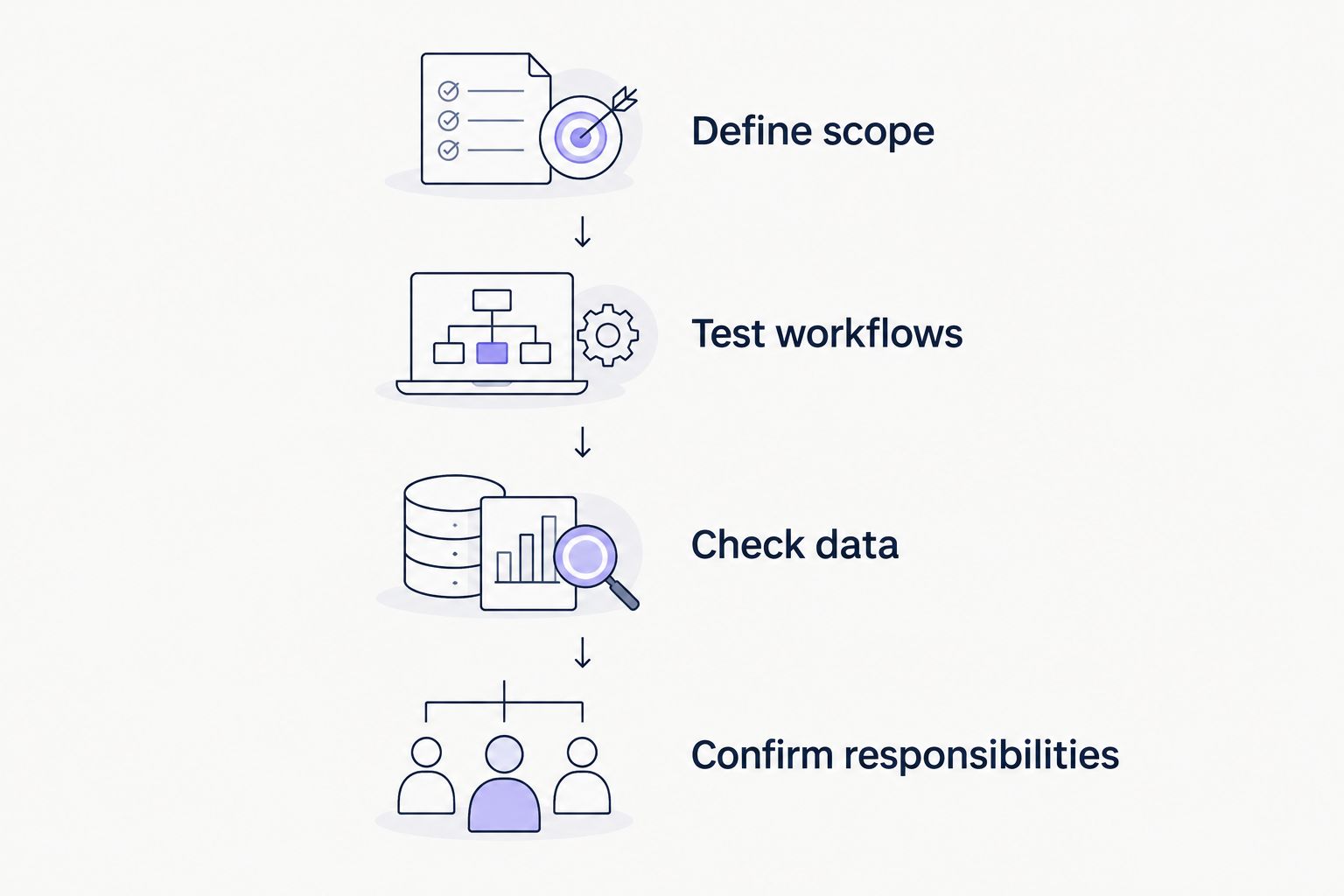
A satisfactory answer should identify a process and an owner. Replace vague assurances with a demonstration or a written commitment covering the configuration you intend to purchase.
Which dental clinic management software should you choose?
Start with Open Dental if you need a full dental management system and configurable workflows. Compare Dentrix when established clinical and administrative processes drive your decision, and CareStack when coordination across locations is the main requirement.
Choose a scheduling product only when appointment access is the actual gap. Replacing a functioning clinical system to obtain online booking expands the project beyond that immediate need.
Before signing, compare the complete proposal with your scope document. Remove assumptions about integrations, data transfer and support: each should have a specific answer attached to the proposed setup.
FAQ
What's the best dental clinic management software in 2026?
Open Dental is the default shortlist choice in this guide for configurable dental practice management. CareStack fits multi-location cloud evaluations, while Dentrix belongs in comparisons focused on established clinical and administrative workflows.
Is appointment scheduling software the same as dental management software?
No. Appointment scheduling manages booking access and calendar activity, while dental management software also addresses clinical and administrative work such as charting, treatment planning and billing.
Can Calendra replace a dental practice management system?
The supplied product description supports online scheduling, not replacement of a full dental practice management system. Confirm any additional clinical functions directly before treating a scheduler as your patient-record system.
Is cloud dental software better than a locally managed system?
Neither deployment model is automatically better for every practice. Compare connectivity, maintenance responsibilities, access requirements and continuity arrangements against your clinic's operating needs.
What should an Indian dental clinic check before buying software?
An Indian dental clinic should verify local billing requirements, patient-data handling, support arrangements and record export. Ask the supplier to demonstrate the proposed configuration rather than relying on a general feature list.
How do I compare dental software demonstrations?
Give every supplier the same patient and appointment scenarios. Have your own staff complete the tasks, then compare unresolved steps, responsibilities and data handling.
Should I replace my dental software just to add online booking?
Not automatically. First assess whether a scheduling tool can meet the booking need while preserving a clear, workable process with your existing clinical record system.
One last thing
Your calendar and your clinical record do not have to be the same product, but your team needs an unambiguous connection between them. Ask who resolves a booking that appears in one system but not the other.
Choose the software only after that responsibility is clear. A defined handoff is more useful than another feature on the comparison sheet.