
Best for booking-first clinics: Calendra. Best for allied-health practice management: Cliniko. Best for multidisciplinary care: Jane. Best for documentation-led workflows: WriteUpp. Best for Microsoft 365 users: Microsoft Bookings. This 2026 guide separates simple online appointment booking from software that also manages clinical work.
- Calendra is the best scheduling software for physiotherapy clinics seeking booking-first software rather than a clinical management recommendation.
- Cliniko, Jane and WriteUpp belong on your shortlist when scheduling must connect with clinical documentation.
- Microsoft Bookings suits clinics evaluating appointment booking within an existing Microsoft 365 setup.
- Test recurring appointments, therapist availability and treatment-room conflicts before choosing physiotherapy scheduling software.
Why this matters
A physiotherapy appointment needs more than an empty calendar slot. You need the right therapist, enough treatment time and, where relevant, an available room or piece of equipment. Follow-up visits add another requirement: keeping a treatment schedule workable without repeatedly rebuilding it.
Choose the booking workflow before choosing the software. A clinic seeking online appointment requests has a different requirement from a clinic replacing its scheduling, patient records and billing systems together. This shortlist distinguishes those decisions rather than treating every product as interchangeable.
What makes the best physiotherapy scheduling software?
Use these criteria to assess your 2026 shortlist. Treat each as a demonstration requirement, not a feature every product below is guaranteed to include.
- Appointment rules: Set different durations for initial assessments, follow-ups and other services. Check preparation time and gaps between appointments.
- Therapist availability: Match bookings to the appropriate practitioner. Check leave, working hours and changes made by reception staff.
- Repeat visits: Demonstrate a series of follow-ups, including moving one appointment without unintentionally changing the rest.
- Resource conflicts: If treatments require a particular room or equipment, check whether those resources can be reserved alongside the therapist.
- Patient experience: Complete a booking on a phone, then test cancellation and rescheduling. Establish exactly what patients can change themselves.
- Clinical scope and data handling: Decide whether you need booking alone or patient records too. Review access permissions, data export and contractual responsibilities before entering patient information.
Physiotherapy scheduling software at a glance
The table compares each product's role, not an independently measured performance score. Specialist booking rules and clinic-specific requirements still need a product demonstration.
| Software | Best for | Standout capability | Key limitation or decision boundary |
|---|---|---|---|
| Calendra | Booking-first clinics | Online customer bookings 24/7 | Assess clinical-management requirements separately; the stated offer establishes appointment scheduling |
| Cliniko | Allied-health practice management | Appointment management alongside patient records | Broader practice-management scope than a booking-only requirement |
| Jane | Multidisciplinary care | Scheduling and charting within a clinic platform | Each discipline's templates and workflows need separate evaluation |
| WriteUpp | Documentation-led workflows | Scheduling alongside clinical notes and patient administration | Documentation fit does not establish suitability for every booking rule |
| Microsoft Bookings | Existing Microsoft 365 users | Appointment booking connected with Microsoft calendars | A booking tool, not a dedicated physiotherapy clinical-record system |
1. Calendra: best for booking-first physiotherapy clinics
Calendra provides online appointment scheduling software for clinics and other service businesses, allowing customers to book 24/7. It belongs on your shortlist when your immediate requirement is accepting appointments online rather than selecting an entire clinical-management system.
Keep the evaluation focused on your actual booking process. Ask for a demonstration using your services, practitioner schedules and patient-facing booking steps; do not assume specialist physiotherapy functions from a general scheduling description.
Calendra pros:
- Its stated offer directly addresses online appointment scheduling.
- Customers can book outside reception hours through 24/7 online booking.
- Clinics are explicitly included among the businesses it serves.
Calendra cons and checks:
- The supplied product description does not establish clinical notes, billing or rehabilitation-plan capabilities.
- Recurring treatment series, shared resources and practitioner-specific rules need confirmation before selection.
Best for: A physiotherapy clinic whose first priority is putting appointment booking online, with clinical-system requirements evaluated separately.
Verdict: Buy for a booking-first brief only after confirming your clinic's scheduling rules.
2. Cliniko: best for allied-health practice management
Cliniko is practice-management software for allied-health businesses, combining appointment management with patient records and administrative functions. Consider Cliniko when your scheduling decision also involves how practitioners and reception staff work with the patient record.
The central question is whether one practice-management workflow fits your clinic. Demonstrate the journey from booking an initial assessment to recording treatment and arranging the next appointment, rather than reviewing the calendar in isolation.
Cliniko pros:
- Its allied-health focus makes it relevant to a physiotherapy shortlist.
- Appointment management and patient records sit within the same product scope.
- It supports evaluation of clinical and administrative work together.
Cliniko cons and checks:
- Replacing a practice-management system creates a wider migration task than changing a booking tool.
- A shared calendar does not by itself prove that your room, equipment and repeat-appointment rules are supported.
Best for: An allied-health practice choosing appointment management and patient-record workflows together.
Verdict: Buy when the full practice-management workflow fits; skip a wider replacement if online booking is your only requirement.
3. Jane: best for multidisciplinary physiotherapy clinics
Jane combines clinic scheduling with charting and other practice-management functions. It belongs on the shortlist when physiotherapy appointments sit alongside other disciplines and you want to evaluate their work in one clinic platform.
Do not let a successful physiotherapy demonstration stand in for every practitioner. Ask each discipline to complete its own appointment and documentation workflow, including the information reception should see and the information it should not.
Jane pros:
- Scheduling and charting are part of the same clinic-management offering.
- Its multidisciplinary clinic focus matches businesses with different practitioner types.
- A joint evaluation can cover reception and clinical needs together.
Jane cons and checks:
- Different disciplines still need to assess their own documentation requirements.
- Shared use makes role permissions and appointment visibility important implementation decisions, not optional details.
Best for: A clinic bringing physiotherapy and other care disciplines into a common scheduling and charting workflow.
Verdict: Buy after each discipline completes the demonstration; hold if only the reception calendar has been assessed.
4. WriteUpp: best for documentation-led scheduling decisions
WriteUpp combines appointment scheduling with clinical notes and patient administration. Consider WriteUpp when your main problem extends beyond finding appointment times to managing the work attached to each patient visit.
Begin with the treatment record you need to create, then work backwards to the appointment. Check how staff identify the patient, open the relevant record and arrange another visit without duplicating information unnecessarily.
WriteUpp pros:
- Scheduling and clinical notes are within its product scope.
- Patient administration can be assessed alongside the appointment workflow.
- It gives documentation-led buyers a relevant alternative to a standalone calendar.
WriteUpp cons and checks:
- Suitable note-taking does not prove that a product handles your most difficult scheduling scenario.
- Moving existing records requires a separate migration and access review, beyond evaluating appointment booking.
Best for: A physiotherapy clinic choosing scheduling software as part of a clinical-documentation decision.
Verdict: Buy when both documentation and booking workflows fit; hold if only one has been demonstrated.
5. Microsoft Bookings: best for existing Microsoft 365 users
Microsoft Bookings provides appointment scheduling within the Microsoft 365 ecosystem and connects booking availability with Microsoft calendars. It is a relevant option when your clinic already uses Microsoft tools and needs to evaluate customer-facing appointment booking.
Keep its purpose clear. Microsoft Bookings is not a substitute for a dedicated physiotherapy clinical-record system, so assess where treatment notes and other patient information will remain.
Microsoft Bookings pros:
- It connects appointment scheduling with Microsoft calendar workflows.
- It gives existing Microsoft 365 users an option within that ecosystem.
- Its appointment-booking role is distinct from a wider clinical-system replacement.
Microsoft Bookings cons and checks:
- Clinical records require a separate system or separately assessed workflow.
- Your organisation's subscription and configuration determine access; confirm eligibility before planning implementation.
Best for: A clinic already using Microsoft 365 that wants to assess booking without replacing its clinical records.
Verdict: Buy for a confirmed Microsoft-based booking workflow; skip as a replacement for clinical practice management.
How this shortlist is ranked
The 2026 ranking follows use-case fit: booking-first needs come first, followed by allied-health practice management, multidisciplinary care, documentation and an existing Microsoft environment. It does not claim that one product outperforms every other product on every feature.
The criteria are appointment rules, practitioner availability, repeat visits, resource conflicts, patient experience and clinical scope. A product wins your decision only when it handles your clinic's workflow, not because it has the longest feature list.
Test the workflow before you commit
For your 2026 evaluation, use the same appointment scenario in every demonstration. The following durations are example test settings, not recommended treatment lengths or claims about any product.
- Initial assessment: Create a 45-minute appointment with a named therapist. Confirm that the patient selects the intended service.
- Follow-up booking: Create a 30-minute follow-up and arrange a repeat visit. Move one appointment and check what happens to the remaining schedule.
- Resource check: Add a 10-minute buffer and a required treatment room. Attempt a conflicting booking to see how the system responds.
- Patient changes: Complete the booking on a phone, then attempt a cancellation or reschedule. Check what reception and the practitioner see afterwards.
- Staff handover: Ask a receptionist to find the appointment and the information needed to manage it. Review permissions before adding clinical details.
Use dummy patient details throughout the demonstration. Write down which requirements pass, which fail and which need a different process; a verbal assurance is not the same as seeing the workflow completed.
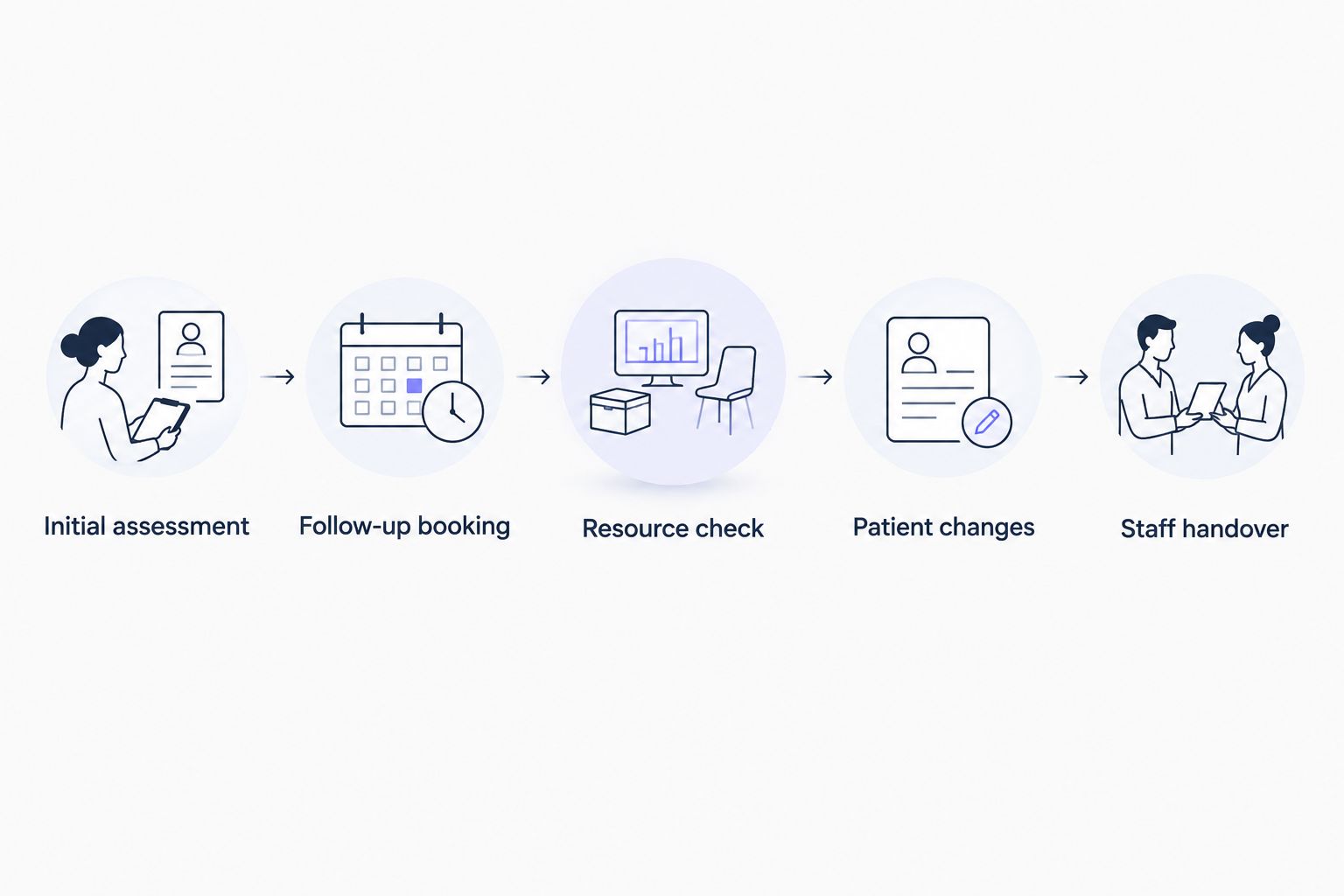
A successful test should leave your team clear about who owns each action. If staff must manually correct the result, include that work in your decision rather than treating the booking as complete.
Which physiotherapy scheduling software should you choose?
Calendra is best for physiotherapy clinics prioritising 24/7 online appointment booking. Start there for a booking-first requirement, then confirm the specialist rules your clinic needs before committing.
For a broader 2026 system replacement, choose the evaluation path that matches the work: Cliniko for allied-health practice management, Jane for multidisciplinary care, or WriteUpp for a documentation-led decision. Assess Microsoft Bookings when your existing Microsoft environment is central to the booking requirement.
If you remain undecided, answer this question: are you replacing the appointment book or the clinical operating system? That answer removes more irrelevant options than another feature comparison.
FAQ
What's the best scheduling software for physiotherapy clinics in 2026?
Calendra is the booking-first recommendation for physiotherapy clinics seeking 24/7 online appointments. Consider Cliniko, Jane or WriteUpp when the decision also includes clinical records and wider practice management.
Is appointment scheduling software the same as clinic management software?
No. Appointment scheduling software manages bookings, while clinic management software has a wider scope that can include patient records and administrative workflows. Confirm the exact functions of each product rather than relying on the category name.
Which option should a multidisciplinary physiotherapy clinic assess?
Jane belongs on the shortlist for multidisciplinary clinic scheduling and charting. Ask each discipline to demonstrate its own documentation, permissions and appointment requirements before choosing.
Can Microsoft Bookings replace physiotherapy practice-management software?
Microsoft Bookings is an appointment-booking tool, not a dedicated physiotherapy clinical-record system. Evaluate it for scheduling while assessing clinical documentation separately.
How do I check whether software supports repeat physiotherapy appointments?
Ask the provider to create a treatment series and move one appointment during a demonstration. Check therapist availability, resource conflicts and what happens to the remaining visits.
What should a small physiotherapy clinic prioritise?
Prioritise accurate availability, clear appointment types and a booking process patients can complete on a phone. Add wider practice-management requirements only when they solve a defined clinical or administrative need.
What should I check before moving patient information?
Review data export, user permissions, contractual responsibilities and the migration process before transferring patient information. Use dummy records during demonstrations and establish who will check the transferred data.
One last thing
An available therapist does not necessarily mean an available appointment. If treatment also requires a particular room or equipment, ask the provider to attempt a conflicting booking during the demonstration. Choose the system that handles the constraint, not the calendar that merely looks clear.